

Amazon Shopping is the official app for buying from Amazon on your phone. You can search, read reviews, place orders and follow packages, and the app adds a few tools the desktop site lacks. It is among the most installed apps on Google Play, with over a billion downloads and an average rating of about 4.4 from roughly 4.7 million reviews.
The latest version, 32.18.0.100, was updated on September 16, 2026. It adds home screen shortcuts: tap and hold the Amazon icon to jump straight to Orders, Daily Deals, your Cart or Search. One important detail is that the app now requires Android 12 or newer, so older phones may not be able to install it. It carries a Teen rating, and Google Play lists in-app purchases from $0.99 to $149.99 per item.
Amazon Shopping requirements: Android 12 and up
- Updated: September 16, 2026
- Version: 32.18.0.100
- Requires Android: 12+
- Developer: Amazon Mobile LLC
- Installs: 1,000,000,000+
Google Play data as of September 27, 2026
What Amazon Shopping 32.18.0.100 changes
The latest version arrived on September 16, 2026 with these notes:
Access popular pages quickly with our new shortcuts. Tap and hold the Amazon app icon to access your Orders, Daily Deals, Shopping Cart, and Search.
Enjoy our latest update where we have fixed some bugs and improved our app to provide you a seamless shopping experience
App-only tools worth using
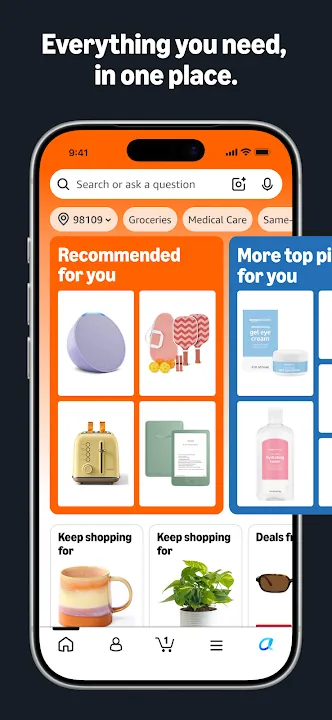
The scan icon in the search bar is the standout. Point your camera at a product or its barcode, and Amazon tries to find the same item. It helps when you see something in a store or at a friend’s house and do not know the brand. In the dark, the app can turn on your flashlight while scanning.
Product pages offer a 360-degree view, and “View in your room” uses your camera to place an item in your space before you buy. That is useful for furniture or decor. Tap the heart icon on any product to save it to Your Lists, and the app will alert you when the price drops.
Voice search is another shortcut. With microphone access turned on, you can say what you are looking for instead of typing it. Reviews stay easy to read on a small screen, and you can add your own photos to a review straight from the camera.
Orders, delivery and support
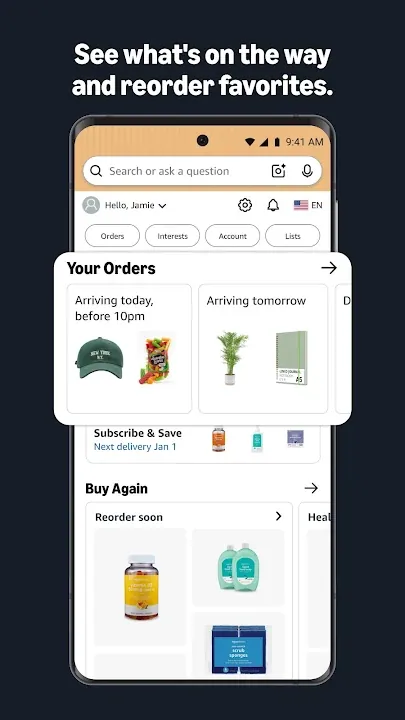
Real-time tracking and delivery notifications show where a package is and when it arrives. Amazon says it delivers to more than 100 countries, in as little as three to five days.
Live chat support is open around the clock. Once you start a chat, it stays open for 24 hours, so you do not have to explain your problem again if you step away. For calls, the app can pre-fill the customer service number on your dialer.
Sign-in is handled so you stay logged in. If you choose to sign out, you can sign back in with your face or fingerprint instead of typing your password.
Permissions, purchases and who it suits
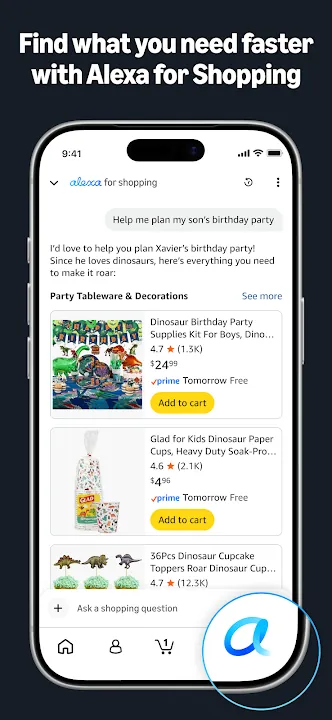
The app asks for a long list of permissions, and Amazon explains each one. Contacts are used to send gift cards or app invites. Camera access covers scanning, adding cards and adding photos to reviews. The microphone is for voice search and the assistant, and location helps with local offers and picking addresses. You can decline the ones you do not need, and the core shopping features still work.
Google Play lists in-app purchases from $0.99 to $149.99 per item. Regular product orders are paid through your Amazon account as usual. On a tablet, Amazon points you to its separate Amazon Tablet app instead.
If you already shop on Amazon, the app is worth having for tracking and price alerts alone. If your phone runs an Android version older than 12, you will need to use the mobile website instead.
Small annoyances to expect
The app is large and packed with features, so it can feel busy compared with a simple store app. Notifications are a big part of how it works. Delivery alerts are genuinely useful, but you may want to trim deal and promotion alerts in your notification settings if they get noisy.
Staying signed in all the time is convenient, but it also means anyone who picks up your unlocked phone can see your orders. Setting up a screen lock, and using fingerprint or face sign-in after logging out, keeps your account safer. The update from September 16 also fixed some bugs, so installing it is worth doing if the app has been glitchy for you.
Product pages, camera search and order tracking in the Amazon app
Amazon Shopping app questions
Why can’t I install Amazon Shopping on my phone?
The current version requires Android 12 or newer. Phones on older versions of Android will not see the latest release in Google Play.
How do I get price-drop alerts?
Tap the heart icon on a product to save it to Your Lists. The app notifies you when the price of a saved item drops.
What are the new app shortcuts?
Press and hold the Amazon app icon on your home screen. You get quick links to Orders, Daily Deals, Shopping Cart and Search.